Merge Expression Parameters
This page described merging VRC Expression Parameters with Asset Merger.
Open the Editor
Asset Merger is implemented as an editor extension for Unity, so you will first need to open the dedicated editor.
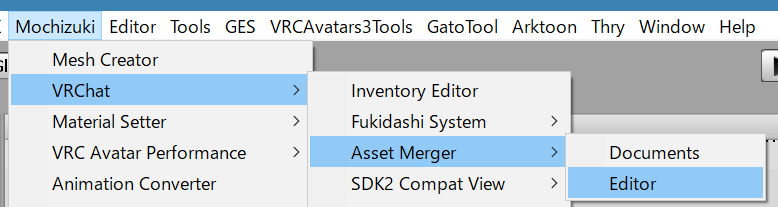
You can open Asset Merger Editor from Mochizuki/VRChat/Asset Merger/Editor in Unity menubar.
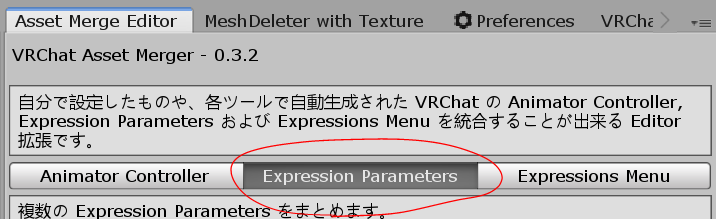
Finally, the dedicated editor opens, select "Expression Parameters" from the editor tab.
Merge Expression Parameters
Once the dedicated editor is open, you can actually merge Expression Parameters.
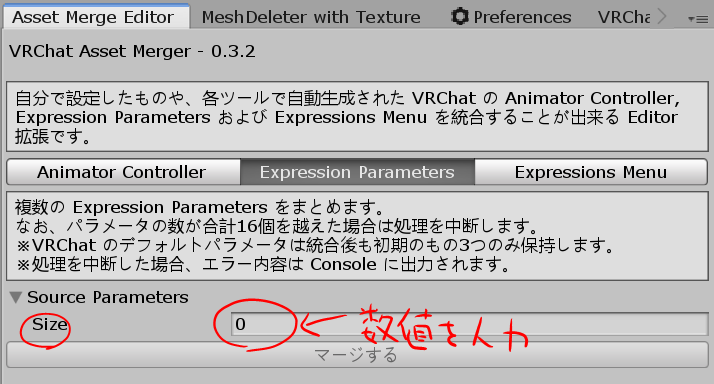
First, enter the number of Expression Parameters you want to merge in the Size of Source Controllers.
Example: If you want to two Expression Parameters, specify 2 to Size of Source Parameters.
After specifying, there will increase below, so set the Expression Parameters you want to merge as shown in the following image.
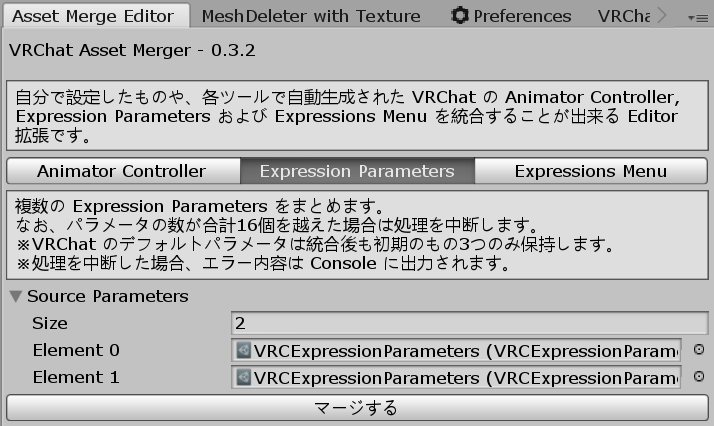
Finally, click the Merge button to start the merging process, and after the process is complete, the file save dialog will appear, and select the location where you want to save the merged file.
Note
Asset Merge will not manipulate VRC Avatar Descriptor, you need to set Expression Parameter manually.